Speak. The text appears at the cursor.
 FlowVoice
AI voice dictation in any Windows app. Clean, punctuated and in the right tone. Free, open source and, if you want, 100% offline.
 # product
 New chat
You see the text as you speak.
- Live, no backtracking
- Words that are still uncertain show up lighter and settle once two answers agree. What has settled never changes.
- One click to redo
- On the result, switch the style, translate, paste or copy. If you already pasted, Replace swaps the text in place.
- Wherever you want, new in 2.2
- While recording, drag the capsule to any corner, even to another monitor. Or pick a position of your own in General → Floating window.
- Glass, new in 2.1
- The capsule can be glass, with Windows' own blur, or translucent. In General → Floating window.
 Quarterly report
One sentence. The right tone for every place.
Pick the style, or let the app in focus pick for you.
You said  in Outlook
“um, hi everyone, so, about the quarterly report, you know, I need each of you to send me your part by Friday, like, by noon, so I can go over everything before Monday's meeting”
Hi, everyone. About the quarterly report: I need each of you to send me your part by noon on Friday, so I can review everything before Monday's meeting.
Formal and organized, ready for email.
Style per app
FlowVoice recognizes the app in focus, even in the browser, and uses the style you set for it.
 Gmail, WhatsApp Web, ChatGPT and others are also recognized inside Chrome and Edge.
Select some text. Say what to change.
In Command mode, Ctrl Alt K rewrites the selection in place, in any app.
- Selected
hey emily, i won't be able to make the meeting tomorrow, something came up here, my bad
- You say
“make it more formal”
- It becomes
Hi, Emily. Unfortunately, I won't be able to attend tomorrow's meeting because something came up. My apologies.
Also works: “translate to Spanish”, “summarize in bullets”, “fix the grammar”. Just want the spelling right? Select and press Ctrl Alt J: Proofread fixes accents and punctuation without changing the words, and you don't say a thing.
Truly free. Even without internet.
- With a free key
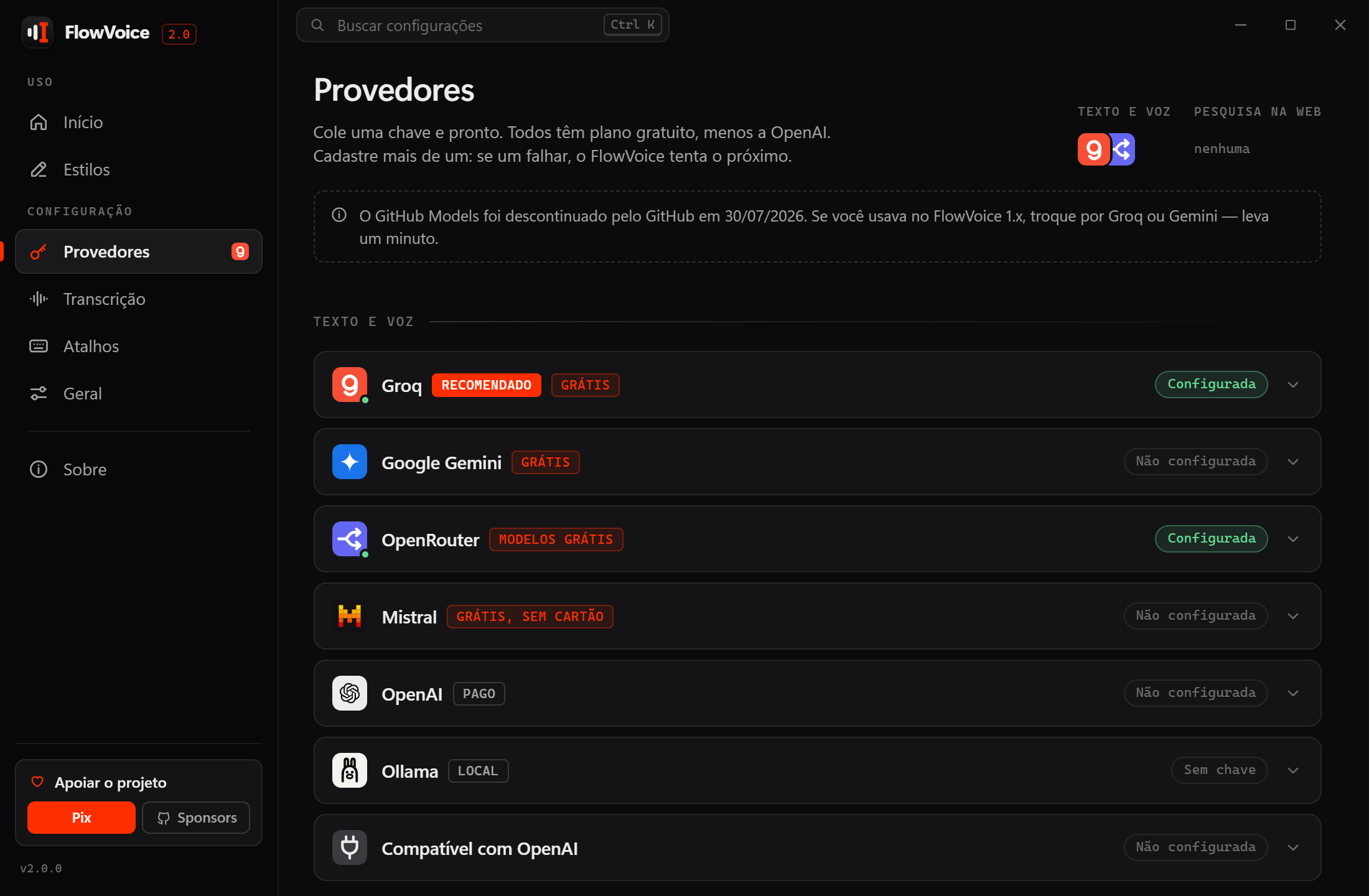
- Groq (the recommended one), Gemini, Mistral or OpenRouter. No card, in a few minutes. See the keys guide
- Or 100% on your PC
- Local Whisper models, including one tuned for Brazilian Portuguese. Nothing leaves your machine.
- No account, no server of ours
- Keys are kept in the Windows Credential Manager. Open source, GPL-3.0 license. Privacy
And the details you'd miss.
- Translation while you dictateSpeak in your language, paste in one of 34. Ctrl Shift Y
- Your own vocabularyNames, brands and technical terms always spelled right.
- Searchable historyEverything you dictated is saved on your PC.
- Hold to talkRecords only while the shortcut is held down.
- Voice assistantAsk out loud, with web search. Ctrl Shift U
- Updates itself~3 MB installer, no administrator rights needed.
- Try againIf transcription fails, the recording stays in memory and one click redoes the dictation.
- Quiet while recordingOptional: the PC's sound is muted during recording and comes back on its own.
- In 10 languagesPortuguese, English, Spanish, French, German, Japanese, Chinese, Russian, Hindi and Bengali.
Quick questions
Is it really free?
Yes. FlowVoice has no server: it uses your key directly with the provider, or runs on your PC. The free plans of Groq and Gemini cover normal daily use, no card needed.
Windows showed a warning during installation. Is it safe?
That's expected: the installer doesn't have a paid signature yet. Click “More info” and “Run anyway”. The installer is built by GitHub Actions from the open source code.
Which systems does it work on?
Windows 10 and 11. The installer is about 3 MB, needs no administrator rights and updates itself.
I found a problem or have an idea. Where do I go?
On GitHub: report a problem or suggest an improvement. Inside the app, under Settings → About, the same buttons already fill in the app and Windows versions.
Made by one person in Brazil, in the open.
FlowVoice is free and always will be. If it saves you time, a coffee through LivePix (Pix, for Brazil) or GitHub Sponsors (any card, monthly or one-time) keeps the updates coming.

livepix.gg/caliberda
Point your phone camera at the code, or click it.
Monthly or one-time, with any card. GitHub passes it all on.
Can't donate? This helps just as much.
- A star on GitHubIt helps more people find the project.
- A bug reportWith the version and the steps, the fix comes faster.
- An ideaSay what would make FlowVoice work better for you.
- Telling someone about itAnyone who types all day will thank you.
FlowVoice
Stop typing what you can say.
Download, paste a free Groq key and do your first dictation in five minutes.